Subflow
Available only in the main Flow.
With a Subflow you can bundle program logic into reusable snippets that can be used across all Flows. This will aid you in reducing redundancy and having a better overview.
The Subflow is similar to a regular Flow with some exceptions:
- There is no concurrency (= parallel execution of branches) within a Subflow
- The Subflow can be used within any other Flow multiple times
- The Subflow Node will wait for the Subflow to finish before it triggers its output
- A Subflow can't call another Subflow: the Subflow Node, Split, Join and the Start, Periodic Event, Condition Event and I/O Event Nodes are offered in the Flow Editor only (Nesting).
Subflow
Use the Subflow list to choose one of the saved Subflows. When there are none, the list says "No Subflows created yet". Its first entry, New Subflow, creates a Subflow and opens the Subflow Editor over the Flow. Choosing a Subflow names the Node after it.
The pencil button below the fields opens the chosen Subflow in the Subflow Editor. Save it there and close the editor with the close button (×).
Save a new Subflow before you save the Flow. Until then the Save button says "Flow contains new and unsaved Subflow. Save it or choose an existing Subflow." If you close a new Subflow without saving it, the field is cleared.
While neither a Subflow nor a Subflow Variable is chosen, the field says "Please select a Subflow or Subflow Variable" and the Node shows Not configured.
Outputs
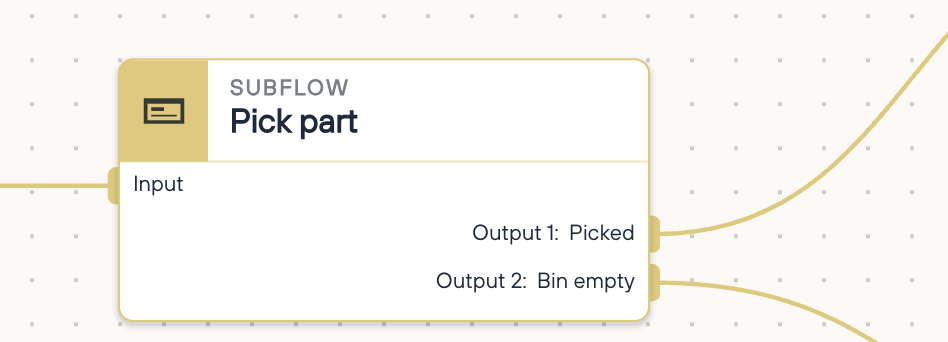
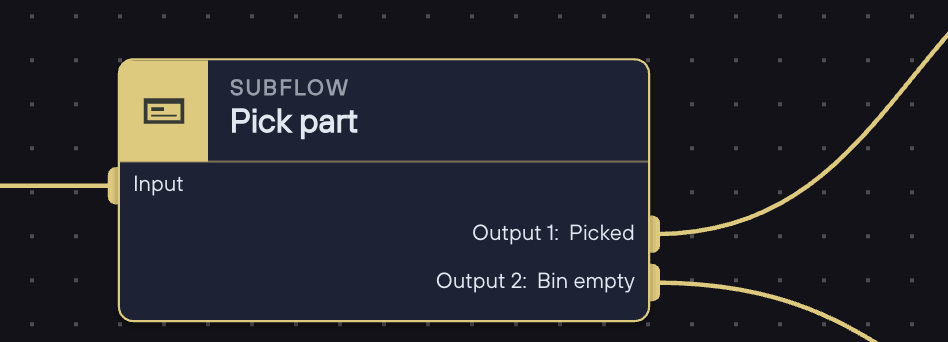
The Node has as many outputs as the Subflow's Outputs setting (1 to 10), which you set in the Subflow Editor's run controls; see Building a Subflow. They are labelled Output 1, Output 2, and so on. When the Subflow Output Nodes for an output have names, the names are added, for example "Output 2: Bin empty".
When the Subflow's output count changes, the Node follows, and connections on outputs that no longer exist are removed. See Connecting Nodes.
Inside a Subflow, you define the output that should be triggered after completion by using the Subflow Output Node. If no Subflow Output Node is reached, Output 1 is triggered.
Make a Subflow from Nodes, or unpack one
These actions are offered in the Flow Editor only. They are in the selection action menu.
- Move or copy to Subflow offers Move to Subflow ("Replaces the selection with a Subflow Node") and Copy to Subflow ("Leaves the Flow as it is"). The Subflow Editor opens on a new Subflow made from copies of the selection, with one output per connection that leaves it. Once you save it, Move puts a Subflow Node in place of the selection, wired in, and Copy leaves the Flow unchanged. A message then offers Open. If you close the editor without saving, nothing changes. Nodes that aren't allowed in a Subflow stay in the Flow (Move) or aren't copied (Copy).
- Unpack this Subflow into the Flow (with one Subflow Node selected) replaces the Node with the Subflow's Nodes, wired in where the Node was. It is offered only when that Subflow is used in exactly one place. The Subflow itself is kept.
One undo reverts a Move or an Unpack.
Subflow Variable
Instead of directly selecting a Subflow, you can also select a String Variable containing the UUID of a Subflow to execute. With this, you can dynamically set the Subflow to be executed during a Flow run by setting the Variable, for example with a Variable Node, or from a Dashboard with a Set Variable or Generic Button Widget. See Reuse and dynamic selection.
The Subflow UUID can be obtained from the URL when the Subflow is open in the Subflow Editor view, e.g.
http://192.168.3.1/subflow/0994c0e2-f43b-438f-87de-c3fcf1fd68cc/.
Subflow Variable offers String Variables only, including read-only ones. OR sits between the two fields: choosing one greys out the other, so clear it to switch.
Outputs (1 to 10, default 1) appears once a Variable is chosen. Make sure to choose enough outputs so that every potential Subflow has its outputs covered. The outputs are Output 1 to Output n.
The pencil opens the Subflow that the Variable names right now. If it names none, the app says "The provided Variable does not contain a Subflow UUID or no Subflow exists with this UUID."
While it runs
A running Subflow Node grows a live, read-only preview of its Subflow with the running Node highlighted; see Subflows during a run.