RobFlow 8.3
Highlights
RobFlow 8.3 is a RobVision update. All changes concern vision-based picking and the RobVision camera.
Also new in RobCo Studio: A major RobCo Studio update adds an annotation tool for RobVision, so you can label your own images for vision training. You can find more information in the RobCo Studio release notes.
- Fewer mispicks: RobVision can now sort out implausible detections before the Robot moves to pick them.
- Latest vision trainings work out of the box: Projects from our newest RobVision trainings run right away, with sensible default settings.
- Easier to judge camera calibration quality: See whether a poor camera calibration comes from the camera image or from the Robot poses, so you know what to fix.
Features & changes
Fewer mispicks with a plausibility check
RobVision can now check every detected part before the Robot picks it. If the detected outline doesn't match the part's CAD shape at the estimated position, the detection is discarded instead of being sent to the Robot. This helps most in cluttered bins and with overlapping or partly hidden parts, where a wrong pose would otherwise lead to a failed pick.
- Opt-in: Enable it per vision solution in the new Filters section. It is off by default, so existing cells behave as before.
- Adjustable: Set how strict the check should be for your parts.
- Requires RobVision 1.2.0 on the device.
Latest vision trainings work out of the box
Projects from our latest RobVision trainings can be deployed and used directly, and RobFlow shows which part types a project recognizes. New solutions start with a detection threshold that fits the project, so less manual tuning is needed during commissioning.
When you switch a solution to another project, the threshold adapts automatically and RobFlow shows you the old and the new value, so nothing changes without you noticing.
Understand your camera calibration quality
The RobVision camera calibration (camera-to-robot) now shows two separate values instead of a single accuracy number, per pose and overall:
- Detection error: how precisely the calibration board was located in the camera image, per pose. High values point to issues with lighting, focus, motion blur or board placement.
- Optimization error: how consistently a single camera-to-robot transformation explains all recorded poses. High values point to the poses themselves (too similar, too few) or to a camera mount or board that moved between poses.
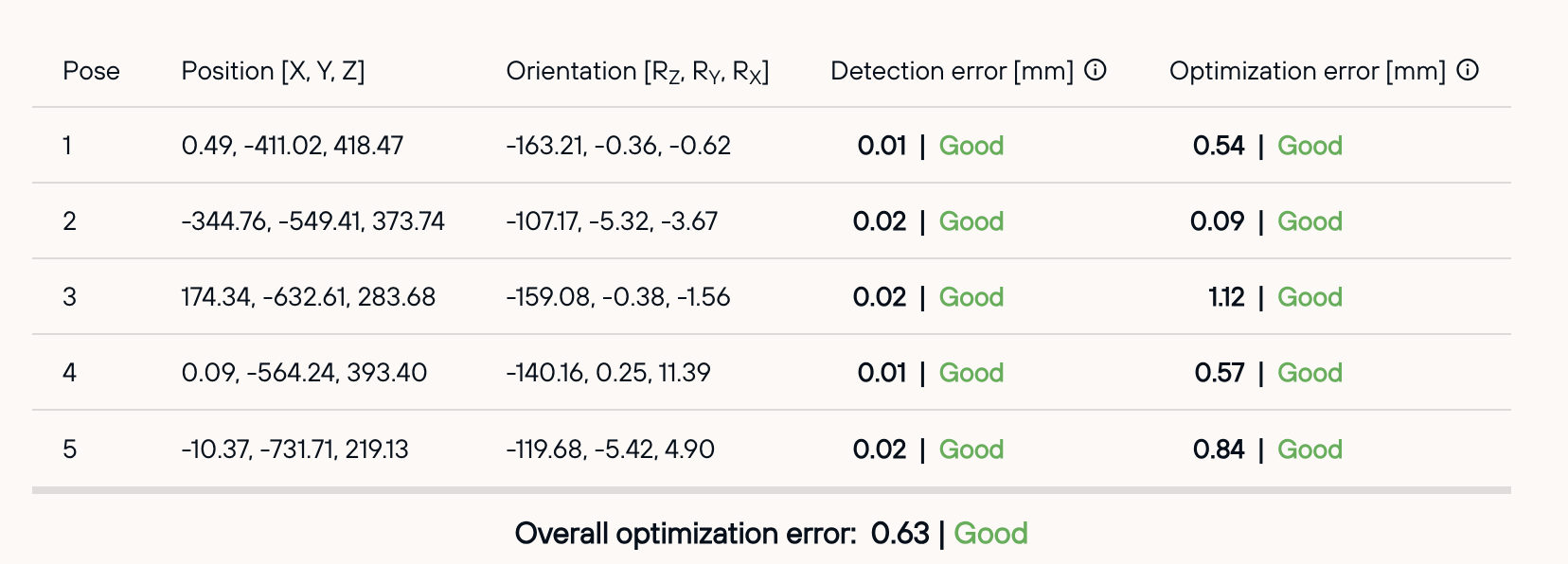
This tells you what to improve before you recalibrate the camera. For your commissioning records, the camera panel also shows the camera's calibration data. Requires RobVision 1.2.0; older devices keep showing the single accuracy value.
Fixes
- Vision projects show version details only when they are available, instead of a misleading default version.
- The RobVision camera calibration wizard keeps its full width after the Robot state panel has been opened and closed.